Documento sin título

The Hewlett-Packard 500 and 500ps

Your options for architectural and engineering drawings, computer generated renderings, GIS, maps, aerial photography, and comparable graphic designs are still an Encad, Canon, or a Hewlett-Packard DesignJet. When you need to do engineering drawings one day yet posters, signs, or banners another day, than it helps to know which brand of printer can produce better quality. If you need to have top quality photographs associated with your drawings, then certain printers will be better than other brands.

I guess you could use an Epson to do line work but they are slow and are known for inexpensive ink and costly media. With HP you get the CAD drivers included in pertinent models. I would surmise that Encad, Canon and Oce CAD printers also have those drivers, but of course HP is the longtime plotter manufacturer since the early days of pen plotters. The FLAAR facility at the university is next door to the department of architecture so we have two CAD-GIS printers, the HP 1055CM and the newer HP 800ps. There is an HP 500ps in the adjacent Dept of Architecture.

At BGSU we are in the same building as the architects, so have acquired plenty of experience in CAD plotters. Our interest in architectural plotters comes from growing up in a family of architects, including three Hellmuth's who work at HOK (Hellmuth, Obata + Kassabaum, Architects).

So far all our reviews cover inkjet printers. We do not review the old-fashioned CAD printers such as Kip America. Most people are moving to inkjet.

We do, however, still receive requests for monochrome printers, and are considering adding reviews of electrostatic CAD plotters in the future. Now that we have a larger evaluation center in the USA it will be easier for us to evaluate those traditional kinds of CAD plotters. Canon, Oce and other companies also offer printers that can accomplish CAD and GIS but we can best review the actual printers which are physically present in our own facilities and these happen to be an Encad printer and three HP DesignJet printers.

Comparative Review

The 4xx, 650 and 7xx series HP plotters have now mostly been replaced by the newer and far better models HP DesignJet 500ps and 800ps . The models 500ps and 800ps can handle photo-realistic quality in addition to drawings and maps, albeit humid weather and worn printheads may cause banding. Vellum and all kinds of appropriate media are available from HP as well. The older HP DesignJet 430, 450C, 488CA were originally made for printing drawings and maps (not for photographs). The 750C Plus, 755CM were early models for maps and GIS (again, not intended for large format display photographs other than aerial photos).

Those early CAD printers were great for their time and place but have been overtaken by dramatically improved technology starting with the 1050 and 1055 series for more sophisticated CAD, computer generated models, maps and GIS. If you include actual photographs, the 1050 and 1055,500ps and 800ps can handle them considerably better than earlier models. For example, the ink cartridges are a tad larger since full-size photos require more ink.

Hewlett Packard 500ps

This is a polite way of saying we do not recommend any of the early model 400-series, 600 series, or 700-series if you will ever need to add photos to your composite images. For serious printing of text it also helps to have a full 600 dpi and PostScript driver, usually organized as RIP software.

HP large format DesignJet printers are Macintosh friendly and of course work with all PCs as well. However the HP 500 and 500ps , being specifically for CAD, are primarily geared to PC users since most CAD software is PC oriented. If you have a Mac-only facility and intend to use the HP 500 or HP 500ps, you need to acquire the new FLAAR Report on the HP 500ps. FLAAR is dual platform (Nicholas is Mac oriented; rest of the staff tend to prefer Dell).

If you want a monochrome-only plotter, you better hurry and buy one of the HP 4xx models or the electrostatic technology of other companies because all the newer HP models (500 and 800 series) are full color. Although you may think of doing just monochrome drawings, you might also consider that perhaps once you learn more about the potential of digital imaging that you can include better images. Furthermore, the older monochrome plotters are sometimes no longer warranted, spare parts become sparse, and you can't find any modern RIP software that runs the older models.

The 500 (you add your own RIP) and the 500 ps (has its own mini-PostScript RIP already on board) are entry-level wide format printers for budget situations. I inspected these and the new model 800 and 800 ps (PostScript, as in a basic version of PostScript RIP) at Seybold trade show several years ago. The low price of the HP 500 and 500ps makes it very tempting. If you are an architect or engineer, be sure that the HP dealer offers the specific drivers and connection cards/cables for your specific setup in your office or home. So far we do not know many aftermarket mainstream RIPs for the 500. Thus we will comment mainly on the HP 800ps, which includes more goodies. We must admit we always like the faster models with more options. Most of the RIPs have been developed for the HP 5000 and HP 5500, so before you think the 500 (no ps RIP) or the 800 (no ps RIP) is a good deal, you need to assure access to an alternative aftermarket RIP. If you are unsure what a RIP is or does, just ask for the FLAAR report series on RIPs.

We do not recommend buying any large format printer from a cut-rate Internet web site. You may be unable to get assistance in installation. If the connecting drivers and cables don't work, there may be no one to bail you out. So whereas you may save a few hundred dollars in the purchase price, you will quickly lose many days trying to work around unpleasant surprises or software bugs.

In general HP printers are self-explanatory, more or less plug-and-play, and definitely easier to operate than most other large format printers. Those said, if you are a first-time user, do yourself a favor and find a capable HP dealer who actually has experience in CAD, GIS or graphic design. Their value-added price is well worth the investment. Stress is not good for your health. A value-added dealer will install everything personally in your home or office. The advantage of the 800, 1050 or 1055 would be in rendering your digital photographs. If at all possible nudge your budget a little to facilitate these improved models. They all should come with a variety of printer drivers for CAD programs. In other words, one printer will do both CAD and photos. The HP 800 has its own onboard CPU, in effect its own internal chip processor with drivers for Windows, AutoCAD and for Macintosh. The slower HP 500 and faster 800 have a completely new ink system and cartridge system as well.

All wide format printers are roll-fed these days. Some, such as HP printers, accept sheet feeding in addition. Students feed our HP even Kraft paper when they wish an artsy-crafty background.

A good place to buy your HP DesignJet printer is from a dealer who knows them inside out as well as has experience with CAD plotters in general. Since FLAAR is as interested in photo-quality as we are in basic CAD drawings and GIS maps we have found an HP dealer who also knows photo- realistic printer hardware and software as thoroughly as they know the CAD and GIS markets. This is Color DNA (listed again later on).

If you seek info on Wasatch SoftRIP for an HP or Encad (thermal printers), contact Jonathan Knecht, tel toll free 888 BIG-COLR, e-mail colorguru@colordna.com .

ColorDNA can provide HP printers nationwide. They specialize in HP DesignJet printers for signage, CAD, GIS, photos, and general applications. We have visited the ColorDNA facilities on several occasions. We only recommend HP dealers whom we know, and whom we trust.

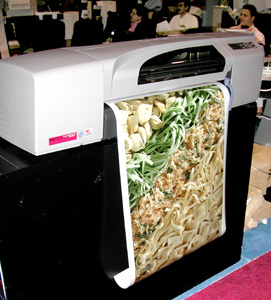
Test page of the HP 500 PSIf you are in Canada or outside USA , please contact your local national dealer. Most USA resellers do not sell outside the continental USA .

For further information on PosterJet RIP in the USA , contact ken@scarabgraphics.com or check out their web site, ScarabGraphics.com. We do not recommend buying any large format printer from a cut-rate Internet web site. You may be unable to get assistance in installation. If the connecting drivers and cables don't work, there may be no one to bail you out. So whereas you may save a few hundred dollars in the purchase price, you will quickly lose many days trying to work around unpleasant surprises or software bugs.

In general HP printers are self-explanatory, more or less plug-and-play, and definitely easier to operate than most other large format printers. Those said, if you are a first-time user, do yourself a favor and find a capable HP dealer who actually has experience in CAD, GIS or graphic design. Their value-added price is well worth the investment. Stress is not good for your health. A value-added dealer will install everything personally in your home or office. The advantage of the 800, 1050 or 1055 would be in rendering your digital photographs. If at all possible nudge your budget a little to facilitate these improved models. They all should come with a variety of printer drivers for CAD programs. In other words, one printer will do both CAD and photos. The HP 800 has its own onboard CPU, in effect its own internal chip processor with drivers for Windows, AutoCAD and for Macintosh. The slower HP 500 and faster 800 have a completely new ink system and cartridge system as well.

All wide format printers are roll-fed these days. Some, such as HP printers, accept sheet feeding in addition. Students feed our HP even Kraft paper when they wish an artsy-crafty background.

A good place to buy your HP DesignJet printer is from a dealer who knows them inside out as well as has experience with CAD plotters in general. Since FLAAR is as interested in photo-quality as we are in basic CAD drawings and GIS maps we have found an HP dealer who also knows photo- realistic printer hardware and software as thoroughly as they know the CAD and GIS markets. This is Color DNA (listed again later on).

If you seek info on Wasatch SoftRIP for an HP or Encad (thermal printers), contact Jonathan Knecht, tel toll free 888 BIG-COLR, e-mail colorguru@colordna.com .

ColorDNA can provide HP printers nationwide. They specialize in HP DesignJet printers for signage, CAD, GIS, photos, and general applications. We have visited the ColorDNA facilities on several occasions. We only recommend HP dealers whom we know, and whom we trust.

If you are in Canada or outside USA , please contact your local national dealer. Most USA resellers do not sell outside the continental USA .

We only recommend resources that offer competent technical support, experience based on years in the business, and a company where we have personally met (and checked out) the people behind the name. Thus if you are considering acquiring any HP DesignJet printer, you can contact Jonathan Knecht with confidence, e-mail colorguru@colordna.com , toll free (888) 244-2657.

For further information on PosterJet RIP in the USA , contact ken@scarabgraphics.com or check out their web site, ScarabGraphics.com.

Bonus Report by Nicholas Hellmuth on the HP 500ps

Available by popular request, a comprehensive evaluation, rating, and comparative review of the HP DesignJet 500ps. We compare and contrast this with the HP 800ps, HP 1050, HP 1055, HP 5000ps, and HP 5500ps (at FLAAR we have all these HP printers readily available at our university facilities).

FLAAR Reports are also available on the HP 5000ps, HP 5500ps, and HP 120nr. 

Most recently updated January 30, 2006.
First posted July 22, 2005, August 12, 2005

Most of our updates for 2006 onward are in the FLAAR Reports in Adobe Acrobat PDF format. It is more efficient for us to make new information available in PDF format. So if the web page itself is not updated, check out www.wide-format-printers.NET to see if the printer, RIP, color management ICC profiles, or other subject is covered in an update which can be easily ordered in a PDF download.


Untitled Document
Free
Download
Download
Download
Download
Download
Download
Download
Download
Download
Download

Untitled Document
Free Via Survey/ Inquiry Form
Link to Adi
Download
Download
Download
Download
Download
Download

Untitled Document


ATPcolor textile printers
ColorSpan
d-gen textile printers
Mimaki textile printers
Mimaki, Stork
Mutoh textile printers
Roland textile printers
Seiko ColorTextiler 64DS
Yuhan-Kimberly Textile Silk, Cotton, Polyester printers

HP Z2100, Z3100
HP Z6100
HP 130nr HP 30n

HP 3000, 3500, 3800
HP 500, 500ps Designjet
HP 4000

HP 4000ps

HP 4500

HP 5500
HP 430, 450
HP 90
HP 800, 800ps
HP 750c

HP 500, 500ps
HP 5000ps, 5000
HP 2800, 3800
HP 1050, 1055

ImagePROGRAF iPF9000
ImagePROGRAFiPF9000s
ImagePROGRAF 8400
ImagePROGRAF 8200
ImagePROGRAF 7250
Canon iPF8000
Canon iP8000s
Canon iPF8100
Canon iPF 500
Canon iPF 600
Canon iPF 700

Canon BJ 9000

Canon BJ W9000
Canon BJ 7000

Epson 10000,10600
Epson 7600, 9600
Epson 7500, 9000
Epson 2200,5500
Epson 9800
Epson Stylus Pro 11800

Epson_Stylus Pro_7800
Epson Stylus Pro 4800
Epson Stylus 4400 7400 9400

HP Latex Inks
Steadtler Lumocolor ink
Eastech Magic Ink


We cover eco-solvent printers on our sister site, large-format-printers

Durst Rho
Nur Tempo
Sericol Inca Eagle 44

UV inks printers

large-format-printers

Bellise, Arizona
Vutek, Nur, Scitex
Raster Graphics
Electrostatic

Laminator
Cutter - Trimmer

Media and Papers
Drytac

EFI Fiery
Onyx PosterShop
PosterJet
Hardware RIPs
Software RIPs
PerfectProof
Best RIP


NovaJet 1000i
Kodak 1200i
NovaJet 880 Flatbed
8 Color 850
NovaJet 500
NovaJetPro 50"
Chroma24

Xerox 8142, 8160
Other Encad

Iris Fine Art Giclee
Kodak 5260
Mimaki JV4
Mimaki JV22-160
Mutoh
Mutoh RJ900
Roland Hi-Fi
Roland 8-Color
Seiko
XES Colorgraf X2


Software
X-rite tools

Books color

BetterLight
Sinar

Digital Photo Course
LightJet
Durst Lambda


Drum
Flatbed
Repro (overhead)

Intermediate Course
Meet Dr. Hellmuth

PRINTER LIST

Untitled Document
FLAAR network easy access menu

Bad link, missing photos, misspellings, report to webmaster. Errors of fact or omissions, report to review editor. Privacy Statement. Background of FLAAR review policies, Copyright FLAAR© 2001-2008. Meet Dr.Nicholas Hellmuth, Who and what is FLAAR.
Updates on wide format printers from March 2004 onward are contained in the
FLAAR Reports. We update these reports constantly, so check out the over
87 titleswhich are now available from our university.

Additional updates from winter 2005 onward are also being put into the FLAAR Report Series in PDF format and are available on www.wide-format-printers.NET.