Kinds of Wide Format Media for your Printer.
Another advantage of wide format printers is that you can print on a wide variety of media. Wide format printers can handle natural paper, synthetic film, vinyl, canvas, and textiles (depending on the kind of printer, the kind of ink, and the goal). In a photography darkroom you can print on photo paper and a few other kinds of media, that's it. The digital future is already here, though some people are only now realizing all the advantages of digital printing.
The only printer that may be limited on what media it can print is the Epson 9500, Epson 7500, and potentially the Epson 10000 (because of it's proprietary encapsulated resin inks). Other printers such as Hewlett-Packard and Encad can print on a much wider range of media. This means that production costs are less for HP and Encad.
 |
|
|
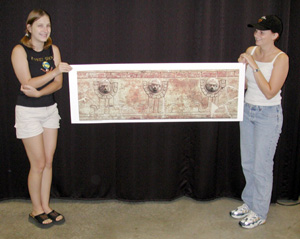
Lisa
and Carley holds up a print for our upcoming exhibit
at the Popol Vuh Museum (of pre-Columbian art). We are using an HP DesignJet 5000ps with UV pigmented inks. |
The best way to figure out which minds of media are best for you is to try them out. You can often get shorter rolls for such trials (especially at the end of trade shows).
Every year new varieties of media are developed. Some of the larger media companies such as Rexam Graphics (Rexam Image Products) supply a wide range. Other media companies specialize in unusual solutions. At one trade show the wide format print was hung in a shower and the water poured over the image eight hours a day. That sure made the impression that this speciality media was water proof.
Here is a general inventory of the standard kinds of material to print on (it's all called "media"). A few of the more unusual specialty materials may have been overlooked (which is why our editors go to trade shows and devour the trade press).
- standard
printing material
- bond paper (in many varieties including colored); often looks kind of cheap
- photo, glossy (really looks good in some circumstances, but very shiny and reflective)
- photo, semi-glossy (my personal favorite)
- photo, matte (for people who just don't like any glossy surface)
- repositionable (peel it off and move it somewhere else; then peel it off again...)
- adhesive backed
- film
(entirely synthetic material, hence the manufacturers can
add all kinds of special properties)
- backlit
- front lit
- clear (transparent)
- white (opaque)
- vinyl
- adhesive backed
- banner
- scrim
- repositionable (static cling)
- canvas
- canvas also comes in a variety of surfaces. Be sure you want the canvas effect before you buy a full roll. Canvas can be shiny or matte. Some canvas is very rough so you don't need to use high dpi
- special
media
- Tyvek
- enough different varieties to fill the entire web site with samples and descriptions, but more on that later.
- Textiles
- there are as many varieties of textiles to print on as all the other media put together. ColorSpan, Encad, Mimaki, Stork and other companies make special printers for printing short-run designs on such specially prepared textiles. Hewlett-Packard 2xxx and 3xxx series of DesignJet printers can print on coated textiles of many kinds. The newer HP 5000 and 5000ps can also print directly onto such paper-backed textiles. The paper backing keeps the threads of the textiles from slipping as it feeds through the feeder advance rollers. The coating is the standard inkjet layer that all paper and other media requires to produce the optimum colors when the inkjet image is printed. Stork, Mimaki, and one model of ColorSpan can print on unbacked textiles. You can also print on transfer paper and then do dye sublimation heat transfer onto coated textiles.
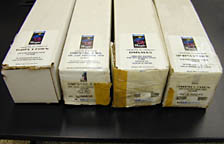 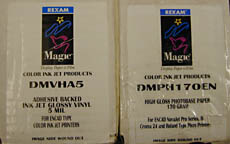 |
Rexam just sent us another shipment of wide format media. This just arrived in our new wide format printing studio in Guatemala (affiliated with the Museo Popol Vuh, Universidad Francisco Marroquin). Rexam Image Products, rexamgraphics.com
For additional information and for help making your decision, ask for the "FLAAR report on signs, posters, banners" (specify whether for indoor signs or outdoor signs in the rain and sun) or for the FLAAR report on "Piezo vs Thermal printheads, fact vs fiction, pros and cons of each kind of inkjet printhead." You can also ask for the report on "Media and Inks for Photo-Realistic and Fine Art Giclee," or "Media and Inks for Sign Printing with Large Format Inkjet."
If this will be your first printer, then we have a special report that holds your hand and leads you through all the basic questions that will assist a first-time buyer of a large format printer. Purchase the FLAAR report on "RIP + Help." This explains what RIP software is, why this is useful, and includes tips, warnings, information, and help for a wide range of matters for a newbie. Here you will really appreciate that FLAAR is based at a university; Professor Hellmuth has plenty of experience writing in a manner that explains what you need, and why.
Most recently updated May 14, 2002.
Previous updates: August 02, 2001.