Questions about lightfastness of Epson inks for Epson 7500, Epson 9500.
FLAAR is one of the few review systems that makes an effort to include a review of advertising claims along with a review of what the actual equipment can, or cannot do. We are especially curious how anyone can produce a claim of ink longevity when these may not be the inks actually in the product when it passes prototype stage. This new chemistry is so new it would be nice to see the final product before we reach a decision. It is also noteworthy that the company which did the original testing dropped the results back an entire century.
Advertising claims are the hallmark of a product. If the ads claim features or function that are unlikely, or unrealistic, what else might not work in this product? If the claims are so exaggerating, what is all this PR attempting to cover up?
The Epson 7500 and Epson 9500 have matured considerably since we first saw them introduced at DRUPA 2000 in Germany.
By the time of trade shows during May 2001 the color gamut of the Epson 7500 was much improved. Today (summer 2003) with better Epson media, the output is even better.
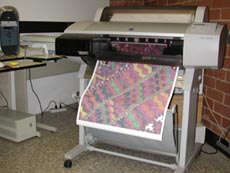 |
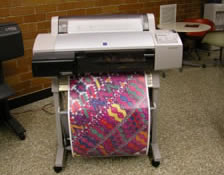 |
| This is the media that came from Epson with the printer. As far as we can tell its only purpose is to clearly reveal that economy media will never work. We had to throw the image away. Of course the same coated bond paper media would look equally bad on most other printers as well. Epson 7500 and Epson 9500 are great for printing beautiful photographs. | This is the same image on media sent by Parrot Digigraphic and Epson-USA. Quality albeit costly but wow, what a difference. This is museum quality output. |
We don't yet have the software update to remove metamerism, so you get a bit of the green tint but reportedly the newer printers such as Epson 7600, 9600, and 10000 have gotten rid of most of the metamerism deficiency which is inherent in piezo printheads. Overall Epson has made considerable strides in the last two years.
Since FLAAR Photo Archive is interested in professional quality reproduction of photographs, we always like to see a great printer that can handle photographic prints. Stay tuned for discussions of the improvements to these new printers as we report the results that we accomplish in our own office.
It took a while to get an Epson 7500, but it has now arrived. The staff at the university report the quality is great as long as you use the nicest media. Setting up the printer was easy, other than that it lacked a network card which costs $450 locally (that particular evaluation center is in Latin America). All other printers come with a network card already installed. Now you know how Epson keeps their costs down.
No
RIP comes with the printer either. Fortunately, you can run
the printer from it's own printer drivers, as our staff did
just fine. Turns out that the USB connection is relatively fast.
Printing is a tad slow however. But many people report they
are willing to wait.
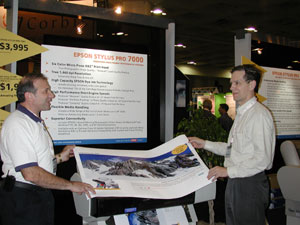 |
| John Lorusso at the left with FLAAR editor Nicholas Hellmuth at one of the many tradeshows. One of the four ways FLAAR learns about printers, inks, and media is to visit as many tradeshows as possible. We even review tradeshows! Ask for our report on them. |
We have two Epson 7500 printers to evaluate now, one at each university. We found that they need to be used frequently or the print heads dry out and clog. This is true with most other printers as well, especially Encad. Just realize up front that you can't abandon your printer more than a few weeks.
The HP DesignJet 800 ps and 24" HP 500 ps lack pigmented inks. No Canon 24" printer is available. The 300 dpi of the Encad Chroma 24 is long ago obsolete. So if you are just starting off with wide format printing at home, a 24" Epson 7500 or 7600 is ideal.
Just realize that Epson itself does not warranty the longevity of the images for even a single year. Furthermore, the claim of 200 year achievability is not taken seriously by the rest of the industry. Also, due to slowness of piezo printheads these printers are intended for occasional prints. If you intend to print 200 or even 20 copies of an image you need a faster printer such as Mimaki JV4.
But what counts is that the images last a few years so we can enjoy them. Most pigmented images should hold up that long.
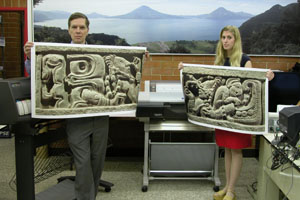 |
| Ancient
sculptures printed at FLAAR facilities in Francisco Marroquin
University, with the Epson 7500. You can see how good is this printer in reproducing these 7th century sculptures from the Copan Maya ruins, Honduras. |
2nd option is to get a value-added system.
If you want to get stunning images that will make your friends and competitors envious, you need to avoid temptation to go low bid. In the long run, the 2nd option will actually save you from wasting ink and media with ruined prints due to lack of someone explaining how to make them picture-perfect.
If you really want technical details on inkjet media, inks, and/or inkjet printhead technology, and especially if you wish to meet the movers and shakers in this industry, be sure to sign up for the next conference organized by IMI. Contact is [email protected]. These seminars are outstanding; the senior review editor of FLAAR usually attends because he can get so much fresh information for the readers of the FLAAR Reports in PDF format and the FLAAR Information Network of web sites.
The advantage of a place that offers both Epson, HP, and Epson is that they can provide some tips on the differences. If a store sells only one brand or the other, they will understandably push the brand they sell.
Most recently updated Aug 27, 2012.
Previous updates: June 3,
2002, Feb 20, 2002, July 12, 2001.